

Shop Drawings. Done Faster.
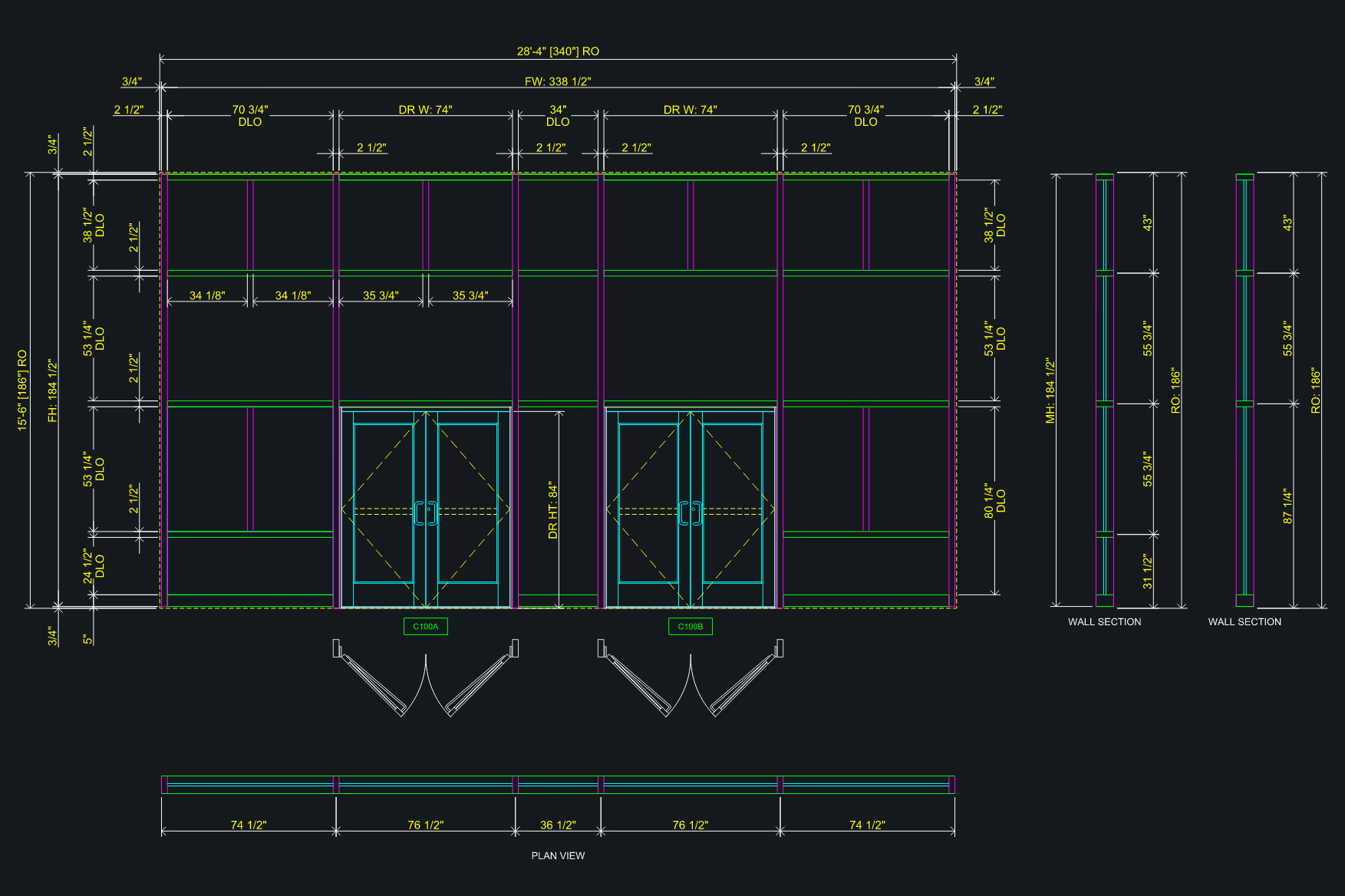
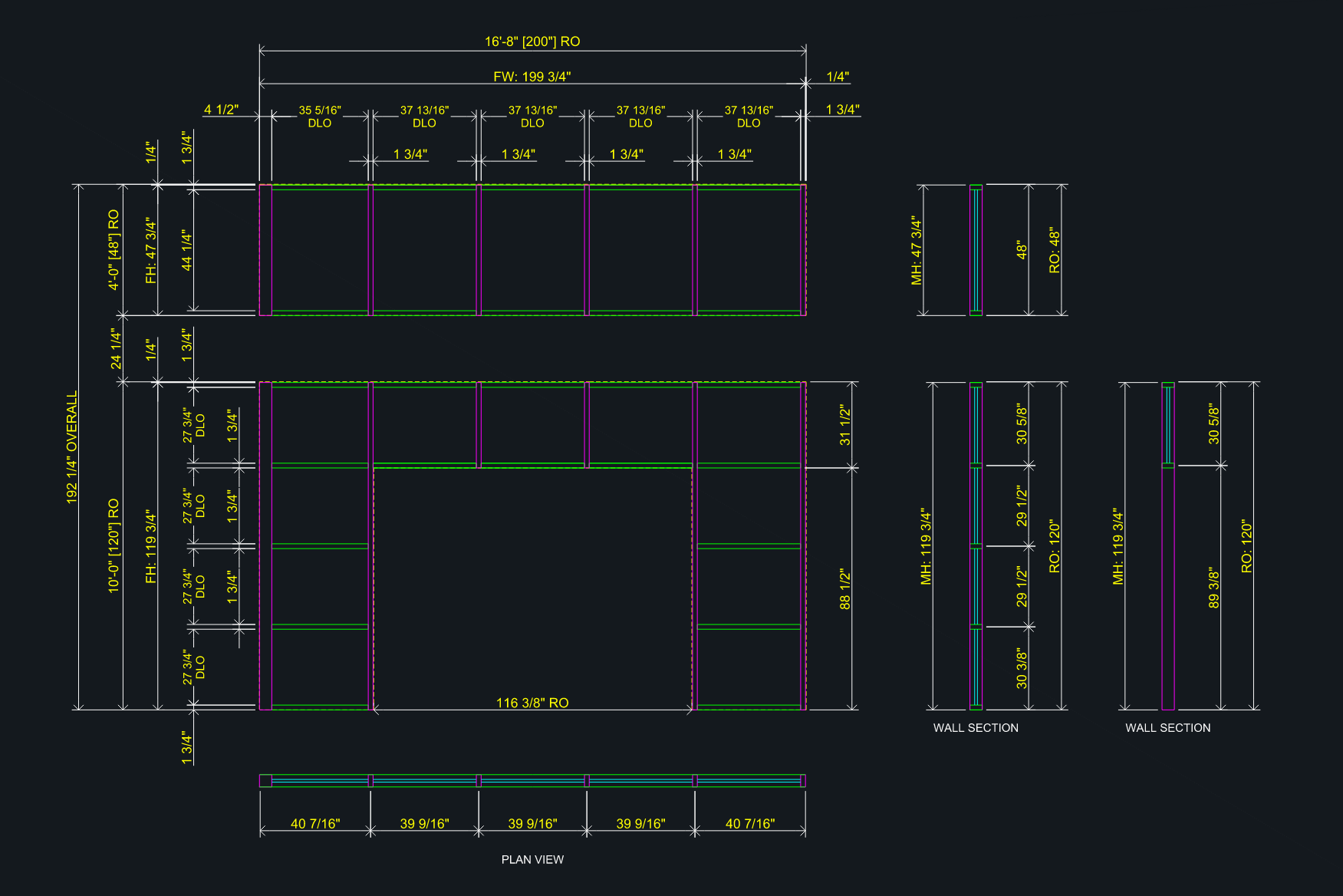
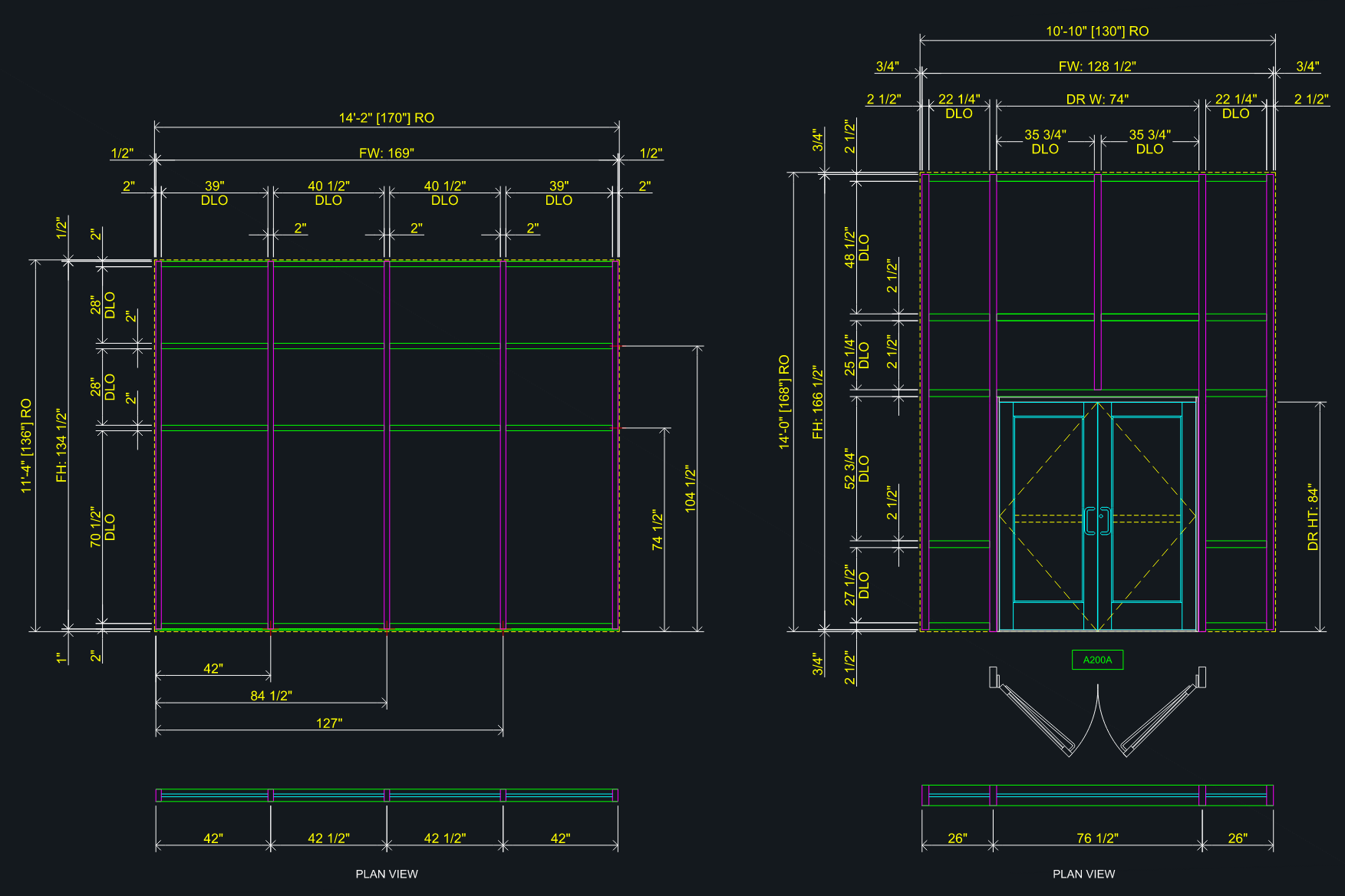
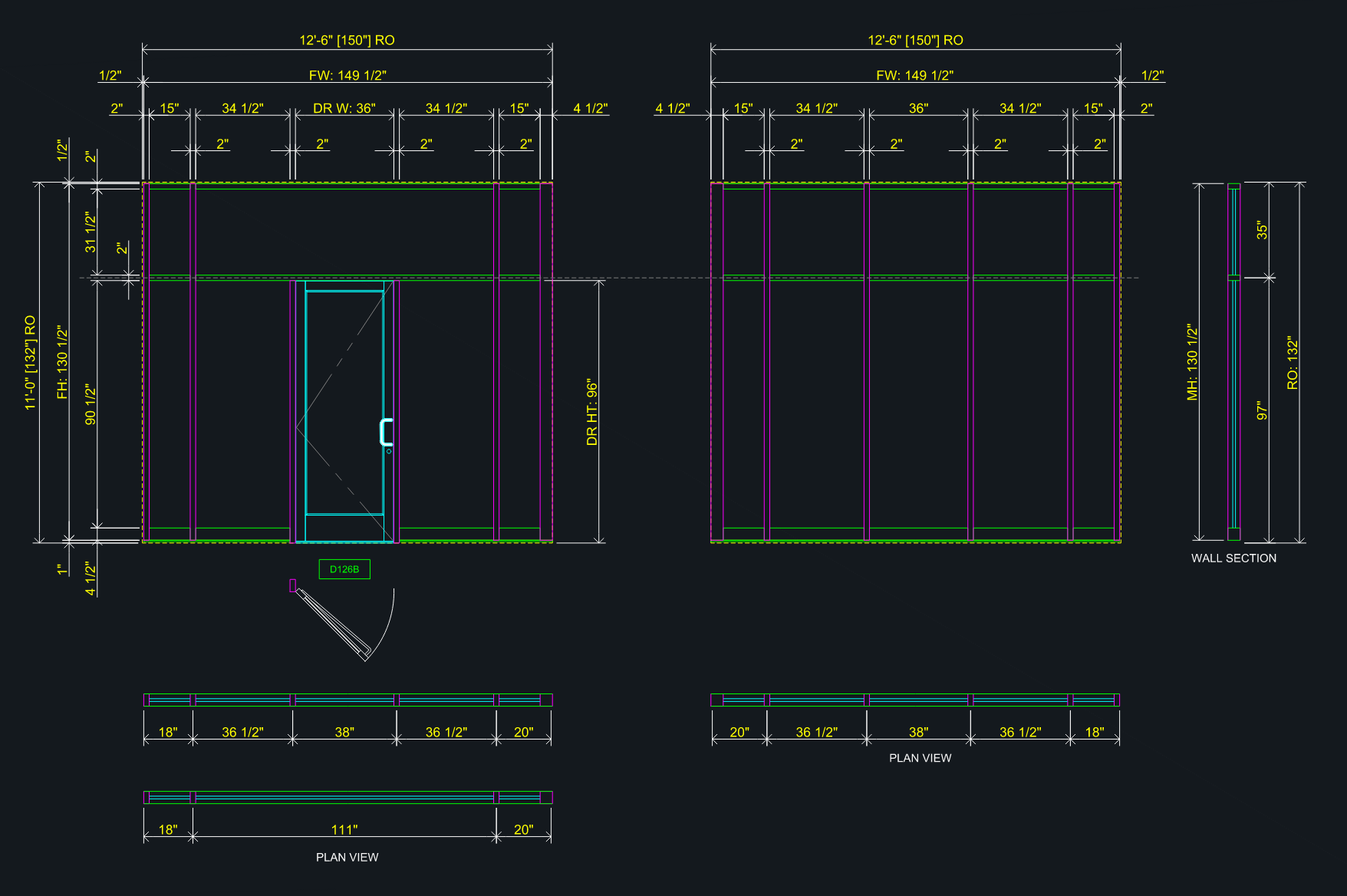
EchoCAD Designs gives drafters and glazing contractors an easier way to produce accurate shop drawing elevations — complete with dimensions, door schedules, and hardware. Built to cut shop drawing production time in half.
Cut shop drawing time by up to 40%
Automate frame layouts, dimensioning, and schedules—no more manual drafting in AutoCAD.
7-day free trial · No credit card required
Faster Shop Drawings. Less Manual Work.
Purpose-built features for drafters and glazing contractors who need accurate shop drawings, fast.
Are the DXFs AutoCAD-Ready?
Generate fully dimensioned elevation DXFs with industry-standard dimension styles. Import directly into AutoCAD LT with one click — extract, drag, and done. No copy-paste, layer cleanup, or grip repositioning required.
How do I create door & hardware schedules from an architect's PDF?
Upload your architect's PDF schedule and let AI extract door types and hardware sets automatically. Export to Excel in one click.
How do I import frame data in bulk using Excel?
Fill in frame data offline using our Excel template, upload it, and have an entire project's worth of frames ready to generate in seconds.
What frame shapes does EchoCAD support?
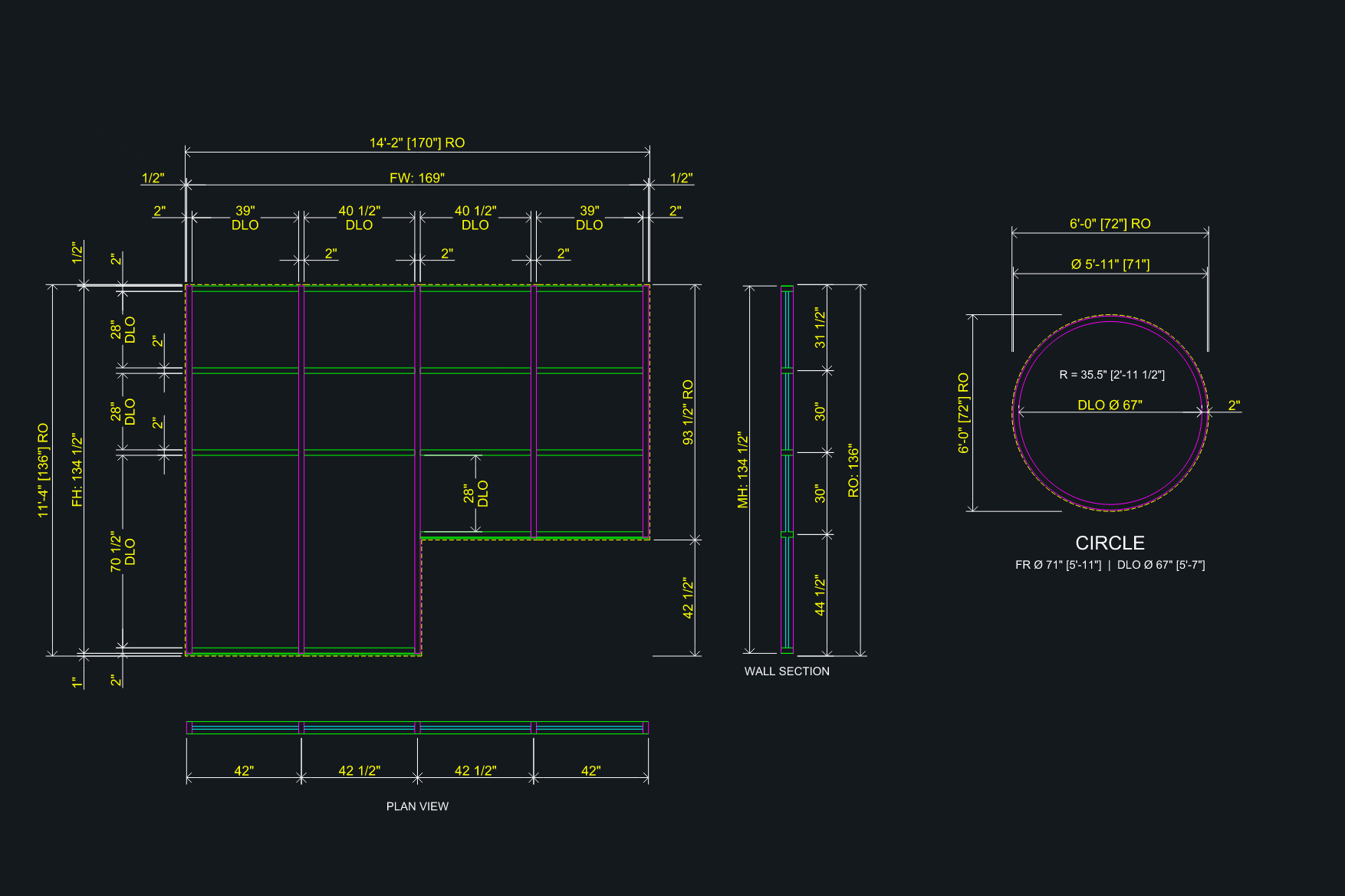
Rectangular, arch, rake, gable, semicircle, triangle, and circle — every frame type your glazing shop encounters.
Can I generate plan and section views alongside my elevations?
Toggle on wall section and plan views to add professional plan cut diagrams alongside your elevations.
Is EchoCAD built specifically for glazing drafters?
Built from the ground up for glazing drafters. Skip the manual setup, the repetitive data entry, and the formatting headaches. Focus on getting accurate drawings out the door faster.
What's New
We ship improvements constantly. Here's what we've been working on.
Last updated:
v7 — Ask EchoCAD & Glass Reports
Meet Ask EchoCAD — the first AI assistant built directly into your project. Ask questions about your frames and glass in plain language, and get instant answers based on your live project data. Whether you need frame details, glass information, or project-specific insights, Ask EchoCAD gives you the information you need without searching through drawings or schedules.
- ✓Ask EchoCAD — AI Assistant — Ask about a single frame, multiple frames, or your entire project in plain language—such as “glass for SF-26” or “glass for SF-24, SF-26, and SF-27”—and get instant answers pulled directly from your live project data. View per-lite details, including DLO, actual glass size, and block size by bay and row, or summarize results by glass type.
- ✓Glass Type Model & Assignment — Configure glass by opening with independent exterior and interior glass selections, each with its own default tempered or annealed glass. Glass is organized into Tempered, Annealed, Spandrel, and Other categories for faster selection. Apply glass to a single lite, an entire row, a full bay, or the entire frame with a single click.
- ✓Glass Library with Family Grouping — Organize your glass library by product family (Solarban 60, 70, 90, and others) with collapsible groups and per-family counts, keeping large libraries easy to navigate and manage.
- ✓Interactive Glass Preview — View every opening in the frame with a live, per-lite grid. Click to select an individual lite, Shift+Click to select a range, then apply or change the glass type—including spandrel—anywhere wall conditions require it.
- ✓Automatic Safety Glazing — EchoCAD automatically applies tempered glass to code-required hazard locations, including bottom lites based on finished-floor assumptions (IBC 2406) and all lites adjacent to door openings from the header down. These rules are fully editable and can be overridden to match specific project conditions.
- ✓Glass Cut List Export — Generate a fabricator-ready Excel cut list in a standard industry format. Each lite is listed with its ID, quantity, actual glass width and height, project, frame, panel, and row—organized by glass type and sorted panel by panel. The output is formatted to fit a single-page width for clean, print-ready reporting. Run it for the entire project or only selected frames.
- ✓Block Square Footage & Purchase-Order Totals — Each glass type includes a Glass Block Summary, showing total block square footage calculated from per-lite rounding rules. This provides a consistent basis for project quantities independent of fabrication cut sizes. Quantities automatically scale based on the number of identical elevations in the project.
- ✓Oversized & Transom Flags — Lites exceeding 50 square feet are automatically flagged for oversized handling, and door transom glass is marked as provisional for verification against final build conditions. Both are clearly identified in the cut list while preserving a clean, uncluttered printed layout.
- ✓Door Glass Capture — Door leaf glass is tracked separately with a single/pair selector and automatically applies standard door-lite square footage based on typical opening heights (7’ and 8’ doors), with full manual override for custom conditions. Door leaves are excluded from frame glass calculations to ensure no double counting occurs.
v6 — Window Schedule Import v2
Upload an architect’s PDF window schedule and EchoCAD automatically extracts the complete frame layout—not just frame marks and RO sizes. Bays, rows, mullion centerlines, and fractional dimensions are captured directly from the schedule, including vertical centerlines measured from the left jamb and horizontal centerlines measured from finished floor, preserved to the nearest 1/16”.
- ✓Auto-Import BETA — With Auto-Import enabled, high-confidence frames are created automatically during upload. Only frames requiring review are held, each backed by a live closure check that validates centerline strings against the overall rough opening. Door openings and clearance conditions are automatically identified and routed for review.
- ✓Centerlines in the DXF — Extracted centerlines flow directly into the generated DXF, placing mullions accurately without manual takeoffs, calculations, or redrawing.
- ✓Architect Profiles — Create a profile once, and EchoCAD learns how that firm’s window marks are structured from a real schedule. Future imports are recognized automatically—eliminating manual setup and ensuring consistent mark detection across every project. Supports complex naming conventions, custom numbering schemes, suffix variations, and firm-specific standards out of the box.
- ✓Extract from Elevation — Re-extract any flagged frame directly from the review table by simply drawing a box around its elevation—no need to leave the import screen. Ideal for curtain wall elevations, oversized frames, or schedules where dimensions couldn’t be read confidently. Once reviewed, your approved values replace the original extraction and the frame is automatically marked as verified.
v6 — Elevation Intake v2
Draw a bounding box around any elevation on a PDF and EchoCAD extracts the complete frame layout—RO width, RO height, bays, rows, and mullion centerlines, ready to import directly to your frame build.
- ✓Single Frame, Detect Region and Detect All Frames modes — Extract a single frame with a precise bounding box, select a region containing multiple elevations and let EchoCAD automatically identify each frame, or process an entire schedule page in one step. Whether you’re targeting a single opening or performing a full-page extraction, EchoCAD minimizes manual selection and accelerates frame capture.
- ✓Multi-Page Schedule Navigation — Quickly jump to any page using the built-in thumbnail page picker. Select a page, draw your bounding box, and extract frames without leaving the workflow.
- ✓Zoom Controls — Zoom in on dense or small-scale elevations for precise bounding box placement.
- ✓Oversized Frame Support — Extract frames 50 feet wide and beyond. EchoCAD preserves complete vertical centerline chains and bay widths across the entire elevation, ensuring critical layout dimensions remain intact.
- ✓AFF Chain Detection — EchoCAD distinguishes frame height from sill height callouts. When a schedule dimensions the sill above finished floor separately, only the actual frame height is extracted, preventing inflated overall dimensions and reducing manual corrections.
- ✓Architect-Specific Detection Profiles — Select an architect profile before importing and EchoCAD uses vector-native mark detection whenever supported, bypassing vision-based extraction for faster, more accurate results.
- ✓System Type Carry-Through — Define the system type (Storefront, Curtain Wall, or Interior) once in the architect profile and EchoCAD automatically applies it to every imported frame, eliminating repetitive setup and ensuring consistency across the entire project.
- ✓EchoCAD Template Setup — Dimstyles (SHOP / SHOP_RO / SHOP_DLO), the full SD- layer system, and every sheet layout — D-size landscape (36×24), portrait (24×36), and 11×17 one-offs. Load it, run it, save your .dwt. Linetypes now build straight into the drawing, so setup runs clean with no external files to hunt down. Runs inside AutoCAD LT 2024+ or full AutoCAD.
- ✓Surrounding Condition Toolset (LISP) — The PDFIMPORT strip-out, gone. Six AutoCAD commands clean and scale a freshly imported detail, lift the manufacturer frame to a frozen layer, and bank the surrounding condition to a per-architect library to reuse on the next project. Runs inside AutoCAD LT 2024+ or full AutoCAD.
- ✓Stacked Frame Export — Per-frame export dim toggles: horizontal dims, vertical dims, and plan view each controlled independently. Top frame suppresses plan view and stacks cleanly below the bottom frame. Bottom frame suppresses horizontal dims — RO width, FW, DLO bay widths, and mullion face dimension above head. Wall section draws relative to its own frame origin.
- ✓Raised Sill Elevation Fixes — Sill pan now extends to the wall face of the step mullion on floor-level bays. Perimeter caulk joint is direction-aware per mullion — correctly placed on the masonry/raised side for both left-raised and right-raised configurations.
- ✓ZIP + AutoCAD Script — Download a ZIP containing your DXF elevation and a ready-to-run
.scrscript. Open AutoCAD, run the script, and your block is inserted, exploded, and dimension style applied — all in one step. No manual layer cleanup or DIMSTYLE switching required. - ✓Window Schedule Import BETA — Upload an architect’s PDF window or glazing schedule and let AI extract every frame mark, RO width, and RO height automatically. Review extracted frames, deselect any you don’t need, and import the rest to your project in one click. Supports schedules from 19+ architectural firms.
- ✓Elevation Intake BETA — Draw a bounding box on any elevation PDF page and let AI read the drawing directly. Extracts RO width, RO height, AFF, mullion centerline positions, and door locations. Review and correct before importing — works on both storefront and curtain wall elevations.
- ✓Multi-Frame Auto-Detect — Point EchoCAD at an elevation sheet and it automatically detects every glazing frame on the page using tiled AI detection. Select which frames to extract, deselect the ones you don’t need, and batch-import in a single pass.
- ✓Multi-Region Draw Mode — Draw multiple bounding boxes on a single sheet and extract all selected frames simultaneously in parallel. Faster than one-at-a-time on dense schedule sheets.
- ✓Per-Bay Horizontal Suppress — In Unique Horizontals, check “No H” on any bay to suppress global horizontal mullions from that bay only. Handles mixed-glazing frames where some bays are full-height glass and others have intermediate horizontals.
- ✓Unique Horizontals — Control horizontal mullion placement independently per bay for both SF and CW RECT frames.
- ✓Insert Mullion — Add partial-span vertical or horizontal mullions within a specific bay/row zone, similar to cripples for doors.
- ✓Reverse Joinery — At door openings, the header runs through the door jamb and extends to the adjacent mullion per side. Cripple above header removed.
- ✓Sill Mullion Height — Control sill member face height independently from the sill pan (4", 4.5", 5", or custom).
- ✓Copy / Reflect — Mirror an existing frame horizontally to create its twin for side-by-side door/sidelite configurations.
- ✓Voice Input — Speak frame dimensions to populate fields automatically. Say "save" at the end to auto-advance to the next frame.
- ✓AutoCAD Block Library — Download pre-made AutoCAD blocks (doors, hardware, details) directly from the app.
- ✓Knee Wall & Dropped Head — Set per-bay sill and head heights for stepped curtain wall and storefront frames. The elevation, RO outline, sill pan, and caulk lines all update automatically.
- ✓Per-Bay Dimension Chain — Frames with bay height overrides now include a stacked vertical dim chain on the right side showing the knee wall height, RO, and head drop for each step.
- ✓True Door Clear Opening — Door widths entered for first and last bay openings now reflect the true clear opening. No more manually adding caulk — what you type is what gets drawn.
- ✓Door Transom Glass Fix — The glass bounding box in door transom areas now aligns precisely with the surrounding frame members, eliminating overlap at edge bays.
- ✓DLO Spacing Independence — Editing a bay DLO width now only shifts the adjacent mullion. Other bays stay locked in place — the last bay absorbs the remainder automatically.
- ✓Equal DLO Spacing — New EQ button in the DLO editor instantly distributes equal daylight openings across all bays or rows, calculated from actual frame geometry.
- ✓Equal CLs Calculator Fix — The Equal CLs button now correctly places centerlines at equal pitch intervals from the RO edge, matching architect schedule dimensions. Edge bay DLOs are correctly smaller than interior bays.
- ✓All 7 Frame Shapes — RECT, CIRCLE, RAKE, TRIANGLE, ARCH, SEMICIRCLE, and GABLE shapes generating AutoCAD-ready DXF elevations.
- ✓Door Openings — Full door support with cripple mullions, transom glass, and header dims across all storefront and curtain wall systems.
- ✓Door & Hardware Schedules — PDF schedule import via AI parsing, with Excel export for AutoCAD Data Link.
- ✓Plan & Wall Section Views — Toggle plan view and wall section alongside the elevation, with adjustable CW depth.
- ✓Corner Frame Caulk Control — Null out the caulk joint on either jamb for 90° corner frames, with adjustable corner mullion face width.
Simple, Transparent Pricing
7-day free trial — no credit card required.
Monthly
Billed monthly. Cancel anytime.
- Full access to all features
- Unlimited projects & frames
- 7-day free trial
Annual
Save 20% — just $12/month billed annually.
- Full access to all features
- Unlimited projects & frames
- 7-day free trial
What Drafters Are Saying
Real feedback from glazing contractors and drafters using EchoCAD every day.
“We cut our shop drawing time from 4 hours down to under 45 minutes per frame set. The DXF pastes right into our master drawing with no cleanup. It just works.”
Mike T.
Project Manager — Commercial Glazing Contractor
“The door and hardware schedule import alone saves me an hour every submittal. I upload the architect’s PDF and the whole schedule is ready to export. That used to be all manual.”
Jason R.
Glazing Drafter — Storefront & Curtain Wall
“Finally a tool that actually understands glazing. It knows what a cripple mullion is, handles reverse joinery, gets the RO dimensions right. No one else has built this for our trade.”
Sandra K.
Estimator & Drafter — Architectural Glazing
Storefront vs. Curtain Wall: What’s the Difference?
Two common glazing systems that look similar but serve very different purposes. Choosing the right one impacts cost, performance, and constructability.
Storefront Systems
Storefront is typically used for ground-floor applications and low-rise buildings. It’s designed to be installed between floor slabs, meaning it carries its own weight but does not span multiple floors. Because of this, storefront systems are more cost-effective and faster to install. They’re ideal for retail spaces, offices, and entrances where structural movement and wind loads are relatively minimal.
Kawneer Trifab 451 Series →Curtain Wall Systems
Curtain wall is engineered for multi-story applications. It hangs from the building structure and spans vertically across multiple floors, requiring more robust design to handle wind loads, deflection, and thermal movement. Curtain wall systems involve more complex engineering, anchoring, and fabrication—which increases both cost and coordination requirements—but they’re essential for mid- to high-rise construction.
Kawneer 1600 Wall System 1 →Common Questions
Everything glazing contractors ask before getting started.
What is EchoCAD Designs?
EchoCAD Designs is shop drawing elevation software built for glazing contractors and architectural drafters. It generates AutoCAD-ready DXF files with accurate dimensions, door schedules, and hardware, helping reduce production time by up to 50%.
What types of glazing systems does EchoCAD support?
EchoCAD supports both storefront and curtain wall systems, with seven frame shape options: rectangular, arch, rake, gable, semicircle, triangle, and circle. It also accommodates door openings, cripple mullions, corner conditions, bay height variations, custom horizontal mullion placement, and reverse joinery configurations.
Can I import door and hardware schedules from an architect's PDF?
Yes. EchoCAD uses AI to extract door types and hardware sets directly from architect-issued PDFs, then exports the structured schedule to Excel for seamless use with AutoCAD Data Link—eliminating manual data entry.
Do the generated DXF files work directly in AutoCAD?
Yes. EchoCAD generates DXF files using industry-standard dimension styles (SHOP, SHOP_RO, SHOP_DLO) that integrate directly into AutoCAD. Simply paste them into your master drawing—no cleanup or reformatting required.
How much does EchoCAD Designs cost?
EchoCAD Designs is $14.99/month or $144/year (equivalent to $12/month — save 20%). Both plans include full feature access and unlimited projects and frames. A 7-day free trial is available with no credit card required.
Does EchoCAD work for curtain wall engineering calculations?
EchoCAD includes a Curtain Wall Structural Pre-Check tool for Kawneer 1600 System 1 mullions, based on ASCE 7-16 wind load methodology. It provides a PASS/FAIL result with a downloadable PDF summary. This tool is intended for preliminary sizing only and is not a substitute for a PE-stamped engineering analysis.
How do I generate a shop drawing with EchoCAD?
Create a project, enter frame dimensions and mullion centerlines, then configure door openings and glass rows. Click Generate All, and EchoCAD will produce fully dimensioned DXF elevations for each frame. Open the files in AutoCAD, then copy and paste them directly into your master drawing.
Built from the Field Up

Darrin Etheridge
Founder, Drafter & Glazing Professional
Darrin Etheridge is the founder of EchoCAD Designs and an owner of Nortex Glass & Mirror, a glazing contractor serving the Dallas–Fort Worth area. With 15+ years of hands-on experience producing storefront and curtain wall shop drawings, he understands exactly where time is lost in the drafting process.
EchoCAD was built to eliminate those bottlenecks—automating frame elevations, reducing manual dimensioning, and removing the need to re-enter door and hardware data.
EchoCAD’s contribution is the automation, not the destination. Generate the framework, export the DXF, open it in AutoCAD—where the drawing has always lived. The tool comes to your workflow. You never have to leave it.
View LinkedIn ProfileNot ready for the software? We've got you covered.
Our team provides comprehensive shop drawing production services tailored for glazing contractors who require fast turnaround without the need for additional setup.
Simply submit your architectural plans, and we will manage the entire process. You will receive a complete, professionally prepared PDF shop drawing package, ready for submittal.
Request a Quote →